
IPTV Smarters Pro: Complete Guide
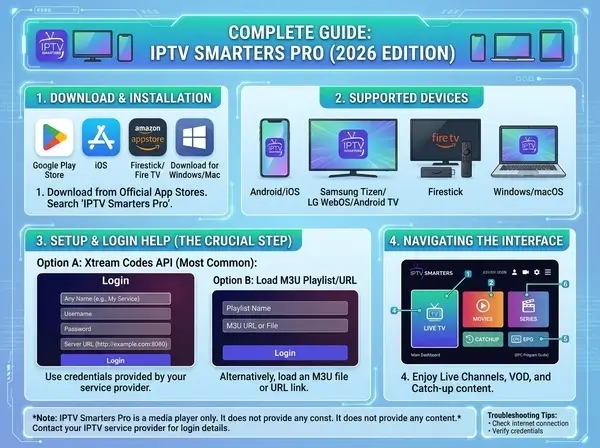
IPTV Smarters Pro Complete Guide 2026: Download, Install & Login on Every Device
I get asked about this app almost weekly by people who've just bought an IPTV subscription and have no idea where to even download it from. So here's the guide I wish someone had handed me the first time — download links, install steps for every platform that actually matters, and fixes for the login errors that trip up almost everyone on their first try.
It isn't the flashiest player on the market, but it's the one that just works once it's set up correctly, which is exactly why it's stuck around as one of the most recommended IPTV apps year after year. This guide walks through setup on PC, Firestick, Android, iPhone, iOS, and Mac, plus the 4-device question everyone eventually asks once they realize one login covers more than just a TV.
In This Guide
What Is IPTV Smarters Pro, Really
This is a player app — not an IPTV service itself. That distinction trips up more people than you'd expect. The app is the window you watch through; the actual channels, movies, and shows come from whatever IPTV subscription you've purchased separately, like IPTV Xtream. It just takes your login credentials (or an M3U playlist URL) and turns them into a usable, organized interface with channel categories, a program guide, and a catch-up/VOD section.
Where the app earns its reputation is consistency. It doesn't crash every other update, the EPG actually loads most of the time, and it's been ported to basically every platform people stream on. That's a low bar in theory, but plenty of competing players still fail at exactly that.
I should mention upfront that this isn't a sponsored writeup — I switched to it a couple years back after getting fed up with a different player that kept losing my channel favorites on every update, and it's just stuck. Not perfect, but it stays out of the way, which is honestly the highest compliment I can give a piece of software like this.
The main channel interface, shown here running on a Firestick 4K Max
Where to Download IPTV Smarters Pro
This is where a lot of guides get sloppy, so let me be direct about it. Download sources differ depending on which device you're on, and grabbing the app from the wrong place is the single most common reason people end up with a broken or outdated build.
- ✓ Amazon Appstore — for Firestick and Fire TV, search "IPTV Smarters Pro" directly
- ✓ Google Play Store — for Android phones, tablets, and Android TV boxes
- ✓ Apple App Store — for iPhone and iPad (listed under "IPTV Smarters Player")
- ✓ Official website APK — for sideloading on devices where the app store version isn't available or up to date
IPTV Smarters Pro for PC and Windows
Looking for a PC version is actually one of the most searched angles on this whole topic, and for good reason — a lot of people prefer watching on a laptop or desktop monitor, especially for sports or background viewing while working from home.
There's no native Windows desktop build distributed through Microsoft's own store in most regions, so the two realistic paths are:
- BlueStacks or an Android emulator — install the emulator first, then install the player through it exactly like you would on a phone. This is the most reliable method and what most setup guides for getting it running on PC recommend.
- Browser-based access — some providers offer a web portal as an alternative, though functionality and EPG quality vary noticeably depending on the build and the provider behind it.
Once installed via emulator, performance is honestly close to native — the interface response time is good, and 1080p/4K playback held up fine in my own testing on a mid-range laptop, no GPU acceleration tricks required. I'd avoid the cheapest emulator alternatives though; a couple I tried years ago choked badly on anything past HD.
Installing on Firestick and Android TV
This is the most common setup scenario, and also the easiest one to get right on the first try. Here's the exact sequence:
- On your Firestick remote, go to the search icon and type "IPTV Smarters Pro."
- Select it from the Amazon Appstore results and click Download/Get. If you don't see it, use the downloader app and type code 78522.
- Once installed, open the app and choose "Login with Xtream Codes API" (the most reliable option) or "Load your playlist or file/URL" if you're using an M3U link instead.
- Enter your Server URL, Username, and Password exactly as provided by your IPTV service — copy-paste rather than retype if at all possible, since a single typo here is the number one reason logins fail on the first attempt.
- Wait for the channel list to populate, then you're in.
Android TV boxes follow nearly the identical process through the Google Play Store instead of Amazon's storefront, with the login screen looking and behaving the same way once you're inside.
What the EPG and VOD Sections Actually Look Like
Once you're past the login screen, the layout splits into a few predictable tabs — Live TV, Movies, Series, and a Catch-Up section if your provider supports it. The EPG (program guide) populates as a horizontal grid you scroll through, similar to a traditional cable guide, and most people find it usable within the first five minutes without needing a separate tutorial for that part specifically.
There's also a parental lock option buried in the settings menu, which is worth turning on if kids have access to the same device — it requires a PIN before opening adult-rated categories, and it's one of those small details that separates a properly maintained player from the dozen half-abandoned clones floating around app stores.
IPTV Smarters Pro for iPhone and iOS
The iPhone version works through the App Store under the name "IPTV Smarters Player" or Iptv Smarters Lite Install it the same way you'd install any other app, then open it and you'll land on the same login screen as every other platform — Xtream Codes API fields or an M3U URL field, your choice.
One thing worth flagging on iOS specifically: Apple's review guidelines occasionally cause version availability to lag slightly behind Android, so if a recent feature update isn't showing up yet on your iPhone, that's typically just App Store review timing rather than anything broken on your end.
AirPlay casting from iPhone to a TV works fine through the app, so if you'd rather watch on the big screen without installing anything directly on the TV itself, that's a perfectly workable shortcut — especially handy if you're at someone else's place and don't want to mess with their Firestick setup.
IPTV Smarters Pro for Mac
The Mac situation follows a similar logic to PC — there isn't a dedicated native Mac build sold through the Mac App Store under that exact listing in most cases, so the practical route is one of the following:
- ✓ Run an Android emulator (same approach as Windows) and install the Android build inside it
- ✓ Use the iOS version through Apple's compatibility layer on M-series Macs, which run iPhone apps natively
- ✓ Cast from an iPhone or iPad using AirPlay to a Mac running as a receiver, or directly to an Apple TV
Of the three, the M-series compatibility route tends to be the smoothest if you're already on an Apple Silicon Mac (M1 or newer), since it's essentially running the genuine iOS build with no emulation overhead at all.
The "4 Devices" Question, Explained
People searching for the 4 devices download angle are usually asking one of two slightly different things, so let's untangle both.
First interpretation: can the same login work across 4 different devices? Generally yes — the app itself imposes no device limit. What actually limits simultaneous streams is your IPTV subscription's connection count, not the player. A 3-connection plan from IPTV Xtream, for example, lets you stream on 3 devices at once, but you can still have the app installed on far more than 3 devices total — you just can't all watch different things simultaneously beyond your plan's connection cap.
Second interpretation: some people specifically mean downloading and configuring the app identically across 4 separate screens in a household — a Firestick in the living room, a phone, a tablet, and a Smart TV, for example. That's straightforward: install fresh on each device and log in with the same credentials every time. The setup steps don't change device to device, which is honestly one of the more underrated things about this whole ecosystem — you learn the process once.
Login Help and Common Errors
Almost every "it isn't working" complaint traces back to one of a small handful of login issues. Here's what actually causes each one and how to fix it, based on the patterns I've seen repeated across dozens of support threads and my own mistakes along the way.
| Issue | Likely Cause | Fix |
|---|---|---|
| "Invalid Username/Password" | Typo or extra space when entering credentials manually | Copy-paste credentials instead of typing; double-check for trailing spaces |
| Login screen freezes on load | Weak or unstable internet connection | Switch to a wired connection or move closer to the router and retry |
| Channels load but show "no signal" | Connection limit on your IPTV plan already in use elsewhere | Log out of an unused device or upgrade to a multi-connection plan |
| App won't open after update | Corrupted cache from the previous version | Clear app data/cache in device settings, then reopen |
| "Connection expired" message | IPTV subscription has actually expired | Check renewal status directly with your IPTV provider |
If none of these match what you're seeing, the next move is usually confirming the issue is on the app side at all — try the exact same credentials inside a different player like TiviMate. If it logs in fine there too, the app isn't the problem and you're looking at a provider-side issue instead. I've burned an embarrassing amount of time troubleshooting a player when the real culprit was an expired subscription the whole time, so check the boring explanation first.
A Quick Word on Reddit Threads and "Free" Login Offers
Searches around subscription discussions on Reddit and free username/password combos floating around online come up constantly, so it's worth addressing directly. Shared or leaked logins almost always get shut down within days once a provider notices unusual simultaneous connections from the same account, and you'll be left right back where you started — minus whatever time you wasted setting it up. Paying for a legitimate IPTV subscription isn't just the legal route, it's also the only one that actually stays working past the first week.
Getting Smoother Playback Once You're Logged In
A handful of small settings tweaks make a real difference once everything's connected, and most people never bother finding them. Inside the app's settings menu, there's usually a buffering size option — bumping it up slightly (from the default to something like 10-15 seconds) trades a touch of extra startup delay for noticeably fewer mid-stream freezes, especially on a Wi-Fi connection that isn't rock solid.
There's also a player engine setting on most builds, letting you switch between the default renderer and an alternative one if a specific channel keeps stuttering. It's not something you'll need often, but it's the first thing worth trying before assuming the whole subscription is at fault over one misbehaving channel.
Need a reliable IPTV service to pair with this app?
IPTV Xtream works seamlessly with IPTV Smarters Pro on every device covered in this guide. Start a free trial — no credit card required.
Start Free Trial →Frequently Asked Questions
Is IPTV Smarters Pro free?
Yes, the app itself is free to download on every platform. What costs money is the IPTV subscription you connect it to — the app never charges anything on its own.
Can I use it on multiple devices at once?
The app can be installed on as many devices as you want. How many can stream at the same time depends entirely on your IPTV subscription's connection limit, not on the app itself.
Why does it keep saying my password is wrong?
This is almost always a typo or a stray space character from manual entry. Copy and paste your credentials directly from wherever your provider sent them rather than typing them out by hand.
Does IPTV Smarters Pro work on Mac without an emulator?
On Apple Silicon Macs (M1 and newer), you can run the iOS version natively through Apple's built-in compatibility layer, which avoids needing a separate Android emulator.
What's better, IPTV Smarters Pro or TiviMate?
It's generally easier for beginners and faster to set up correctly the first time, while TiviMate offers deeper customization for users who already know how they like channels organized. Both connect to the same IPTV subscriptions without issue.
Is there an official mod apk version?
No. There's no officially sanctioned "mod apk" version, and downloading one from a third-party site risks malware. The genuine app is free through official app stores, so there's no legitimate reason a modded version would offer anything extra.